No. AirTags cannot be charged, and they do not need to be. Each one runs on a standard CR2032 coin cell that lasts about a year, and when it runs down you replace it in roughly fifteen seconds without any tools.
That is the whole answer. The rest of this page covers how to check the battery, how to swap it, and the one thing about replacement batteries that catches people out.
Checked August 2026. The battery design has not changed since AirTag launched in 2021, and the same CR2032 cell applies to every unit.
Why there is no charging port
An AirTag has no port, no wireless charging coil and no rechargeable cell. It is a deliberate trade-off: a replaceable coin cell means a fully sealed, water-resistant body with nothing to wear out, and one battery change a year rather than a charging routine.
The practical upside is that an AirTag never runs flat because you forgot to charge it. The downside is that you need to notice the low-battery warning, which is easy to dismiss.
How long the battery lasts
Apple’s figure is about one year of everyday use. In practice it varies:
| Use | Typical life |
|---|---|
| Normal — on keys or in a bag | 10–14 months |
| Frequent Precision Finding and sound alerts | 8–10 months |
| Rarely moved, e.g. left in a car | Up to 18 months |
| Cold climates | Shorter — coin cells lose capacity below freezing |
What drains it fastest is the speaker. Every time you play a sound to find something, and every time Precision Finding runs, the battery takes a real hit.
Check the battery level
There is no percentage — only a warning when it gets low.
- Open the Find My app on your iPhone or iPad.
- Tap the Items tab.
- Select the AirTag.
A low battery shows as a warning icon beneath the name. Nothing there means the battery is fine.
You also get a notification on your iPhone when a paired AirTag needs a new battery — worth not dismissing, since there is no second reminder until it dies.
Replace the battery
Fifteen seconds, no tools:
- Hold the AirTag with the polished steel side facing up.
- Press down on the steel cover and rotate it anticlockwise until it stops.
- Lift the cover off.
- Take out the old CR2032. Note which way up it sits — positive (+) faces up, towards you.
- Drop the new cell in, positive side up. Press until it seats.
- Refit the cover, aligning the three tabs with the slots, press down and rotate clockwise until it stops.
The AirTag plays a sound when the new battery makes contact. If it does not, the cell is upside down or not fully seated.
The battery gotcha nobody mentions

Many CR2032 batteries are sold with a bitterant coating: a bitter-tasting layer applied to deter children from swallowing them. It is a genuinely good safety measure, and it is also non-conductive.
In an AirTag, that coating can sit between the cell and the contact, so the AirTag either does not power on or works intermittently. Apple has acknowledged this. Duracell’s coated cells are the ones most often reported, but they are not the only brand that uses one.
What to do: buy CR2032 cells without a bitterant coating, or wipe the flat contact faces firmly with a dry cloth before fitting. If a brand new battery produces no sound at all, the coating is the first thing to suspect — not a faulty AirTag.
Coin cells are dangerous if swallowed. A CR2032 lodged in a child’s throat can cause severe internal burns within hours. Keep new and used cells out of reach, and treat a suspected swallowing as an emergency — go to hospital immediately rather than waiting for symptoms. The bitterant coating exists for a reason, even if it complicates this particular device.
What an AirTag needs to work
AirTag has no GPS of its own. It broadcasts a secure Bluetooth signal, and any nearby Apple device in the Find My network relays its location anonymously. That is why it works well in a city and poorly in an empty landscape — it depends on other people’s iPhones passing by.
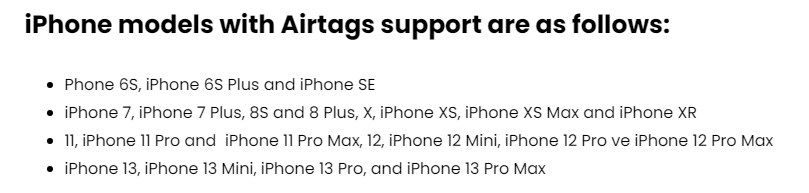
To set up and track: an iPhone or iPad on a current version of iOS or iPadOS, signed in to iCloud with Find My enabled and two-factor authentication on.
For Precision Finding — the on-screen arrow and distance that guides you to within a few centimetres — you need an iPhone with a U1 or newer ultra-wideband chip. Without one, tracking still works; you just get a map and a sound rather than an arrow.
Frequently asked questions
Can I recharge an AirTag battery?
No. CR2032 cells are not rechargeable, and attempting to charge one risks it leaking or rupturing. Replace it.
What battery does an AirTag use?
A CR2032 3V lithium coin cell — the same type used in car key fobs, bathroom scales and motherboards. Widely available and inexpensive.
What happens when the battery dies?
The AirTag stops broadcasting and its last known location is what remains in Find My. It does not remember where it went after that, so replace the battery when you get the warning rather than after.
Does an AirTag still work after the battery is replaced?
Yes, immediately, and it stays paired to your Apple account. No setup is required.
Is it waterproof?
AirTag is rated IP67 — it survives immersion in one metre of water for up to 30 minutes. That covers rain and an accidental drop in a puddle. It is not a diving accessory, and make sure the cover is fully rotated closed after a battery change.
Does an AirTag work with Android?
Not for tracking your own items — setup and tracking need an Apple device. Android phones can, however, detect an unknown AirTag travelling with them and read its details by tapping it, which is the anti-stalking feature rather than a tracking one.