Error 0x800704C7 is Windows reporting that an operation was cancelled. Something stopped the update part-way — a service that was not running, security software that intervened, or a genuinely interrupted connection.
It is not a corruption error and it is not a licensing error, which rules out a lot of the advice you will find for it.
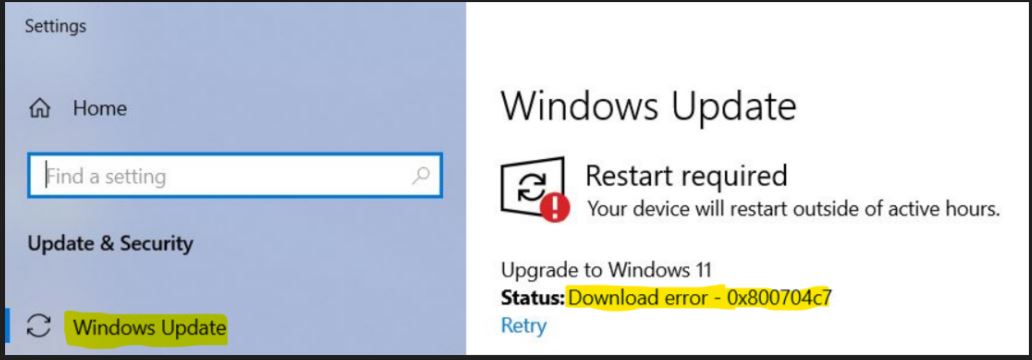
Checked August 2026. Applies to Windows 11 and Windows 10 22H2. Windows 10 left support on 14 October 2025.
1. Wait, then retry once
Not a joke. This error frequently appears when an update collides with something else Windows is doing — a scan, another update, a scheduled maintenance task.
- Restart the machine.
- Leave it idle and connected for ten minutes.
- Check for updates once.
Repeatedly clicking retry while the machine is busy tends to reproduce the same collision.
2. Check the update services are running
The most common concrete cause. If wuauserv is stopped or disabled, requests are cancelled rather than served — which is exactly what this error says.
- Press Win + R, type
services.msc, press Enter. - Check each of these:
| Service | Startup type | Status |
|---|---|---|
| Windows Update | Manual (Trigger Start) or Automatic | Running or stopped is fine |
| Background Intelligent Transfer Service | Manual | — |
| Cryptographic Services | Automatic | Running |
| Windows Installer | Manual | — |
Any of them set to Disabled is the problem. Double-click, set the startup type as above, select Apply, then Start.
A service set to Disabled did not get that way on its own — it is usually the work of a “debloat” or “privacy” script run at some point in the past.
3. Run the Windows Update troubleshooter
Windows 11: Win + I → System → Troubleshoot → Other troubleshooters → Run next to Windows Update.
Windows 10: Win + I → Update & Security → Troubleshoot → Additional troubleshooters.
It resets service states and permissions, which addresses the most likely cause directly.
4. Turn off security software temporarily
Third-party antivirus is the second most common cause. Some products treat a system file replacement as suspicious and cancel it.
- Disable real-time protection.
- Retry the update.
- Turn protection back on immediately afterwards.
If that was it, add an exclusion rather than leaving protection off — or consider whether you need a third-party product at all, given that Microsoft Defender does not interfere with Windows Update.
5. Reset the update components
From an elevated Command Prompt:
net stop wuauserv
net stop cryptSvc
net stop bits
net stop msiserver

ren C:\Windows\SoftwareDistribution SoftwareDistribution.old
ren C:\Windows\System32\catroot2 catroot2.old

net start wuauserv
net start cryptSvc
net start bits
net start msiserver
Start every service you stopped. Leaving wuauserv stopped is how a machine ends up silently never updating — and it is a very common outcome of following an abbreviated version of these instructions.
6. Repair system files
DISM /Online /Cleanup-Image /RestoreHealth
sfc /scannow
DISM before SFC. Reboot afterwards and retry.
7. Check the connection
A dropped connection cancels the transfer, and cancellation is precisely what this code reports.
- Prefer a wired connection while updating.
- Check that your network is not set as Metered: Settings → Network & internet → your connection → Metered connection. Metered networks pause update downloads by design.
- Disconnect any VPN.
8. Install the update manually
If one update fails consistently, get it from the Microsoft Update Catalog: note the KB number from Update history, search for it, download the package for your version and architecture, run the .msu.
Where this error also appears
0x800704C7 is a general “cancelled” code, so it turns up outside Windows Update:
- Microsoft Store downloads — same causes: services, security software, connection.
- File copies — usually a genuine cancellation, or a permissions refusal. See error 0x80070005 for the access-denied case.
- Application installers — antivirus intervening is the usual reason.
Frequently asked questions
What does 0x800704C7 mean?
It maps to ERROR_CANCELLED — the operation was stopped before it completed. Windows is reporting that something cancelled it, not that a file was bad.
Did I cancel it by accident?
Possible but unlikely. A stopped service, security software, or a dropped connection cancels it far more often than a person does.
Is my system corrupted?
Not necessarily, and this error is not evidence of it. Run DISM and SFC to be sure, but start with the services and the antivirus.
Why does it keep coming back?
Because the underlying cause is still there — most often a service set to Disabled, or an antivirus product intervening every time. Fix the cause rather than retrying.
Can I ignore it?
No. The update did not install, so you are missing whatever it contained — usually security fixes. Work through the steps above rather than leaving it.