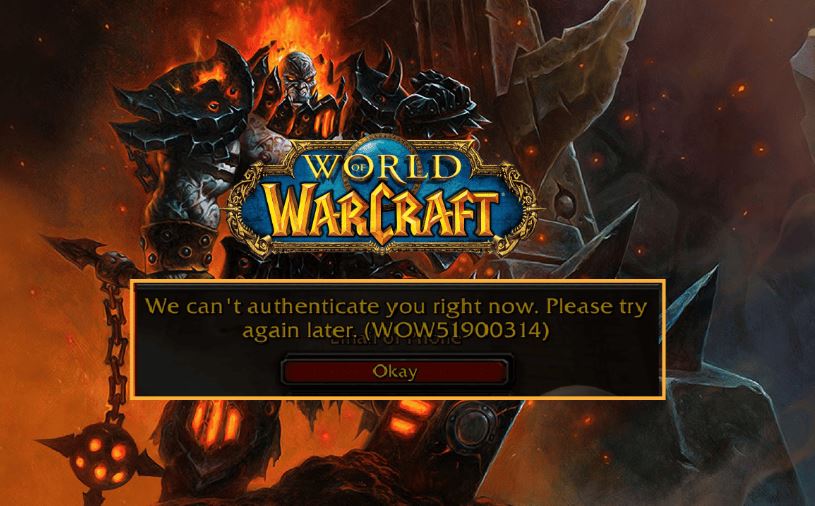
WOW51900314 means the World of Warcraft client lost its connection to the server. It is a network error, not a game fault — which is why reinstalling the game almost never helps, and why the fixes below are mostly about the path between you and Blizzard.
Checked August 2026. Applies to retail World of Warcraft and Classic on Windows and macOS.
1. Rule out Blizzard’s side
Thirty seconds, and it saves an hour.
- Check Blizzard’s support and status pages and their customer support account.
- Check whether it is realm-specific — if a realm is having problems, other realms will be fine.
Weekly maintenance and patch days both produce this error at scale.
2. Reset the network stack
The most effective local fix, and the one that resolves the largest share of persistent cases. From an elevated Command Prompt:
ipconfig /release
ipconfig /flushdns
ipconfig /renew
netsh winsock reset
netsh int ip reset
Restart the computer afterwards — the last two commands do not take effect until you do.
3. Use a wired connection
WoW is unusually sensitive to brief interruptions. A wi-fi connection that streams video perfectly can still drop enough packets to disconnect the game, because streaming buffers and a game cannot.
If a cable is genuinely impossible:
- Use 5 GHz if you are close to the router, 2.4 GHz if far.
- Change the wi-fi channel if you are in a crowded area.
- Check nothing else is saturating the connection — cloud backups, game downloads, another device streaming.
4. Reset the user interface
Addons are a genuine cause, particularly after a patch. Blizzard’s own reset procedure:
- Close the game and the Battle.net app completely.
- Go to your World of Warcraft folder, then into the version folder (
_retail_or_classic_). - Rename Cache, Interface and WTF to CacheOld, InterfaceOld and WTFOld.
- Start the game.
Renaming rather than deleting keeps your settings and addon configuration recoverable. If the problem goes away, an addon was responsible — restore them in halves to find which.
5. Scan and repair
- Open the Battle.net app.
- Select World of Warcraft.
- Open the gear icon next to Play → Scan and Repair.
This checks the installation and replaces damaged files. Slow, and worth running once before more drastic steps.
6. Check what is between you and the server
- Disconnect any VPN. Shared VPN routes add latency and drop packets, and are a common cause of exactly this error.
- Turn off proxies: from an elevated prompt,
netsh winhttp show proxy, andnetsh winhttp reset proxyif something unexpected is set. - Allow the game through the firewall rather than turning the firewall off — see allowing an app through the firewall.
- Try a different DNS, such as 1.1.1.1 or 8.8.8.8 — see how to change DNS servers.
7. Find where the connection breaks
If it keeps happening, a trace tells you whether the problem is your network, your ISP, or further out. Run this while the game is running:
pathping us.actual.battle.netSubstitute the address for your region. Look at where packet loss first appears:
- At the first hop — your router or local network.
- Within the first few hops — your internet provider. Worth reporting to them with the trace.
- Only at the destination — often normal, as many servers deprioritise responding to these probes.
A trace showing consistent loss at your ISP’s hops is something they can act on, and is far more persuasive than “the internet keeps dropping”.
8. Update network drivers
Get the driver from your motherboard or laptop manufacturer, not from Windows Update and not from a driver updater tool. See using Device Manager.
While you are there, in the adapter’s Power Management tab, clear Allow the computer to turn off this device to save power. That setting causes disconnections during quiet moments in game.
9. Rule out other software
- Overlays: Discord, Steam, NVIDIA, MSI Afterburner and RivaTuner all inject into the game. Turn them off to test.
- Third-party antivirus: disable real-time protection briefly, test, turn it back on.
- Background applications: particularly anything doing large transfers.
If it happens at a specific moment
A disconnect that always occurs at the same point — entering a particular zone, opening a specific window, on a specific character — is usually an addon or a corrupted cache rather than the network. Reset the interface as above, and try with all addons disabled.
Frequently asked questions
What does WOW51900314 mean?
The game client lost its connection to the server. It is a general disconnection code and does not identify the cause.
Is it my internet or Blizzard’s servers?
Check the status pages first. If everything is reported healthy and only you are affected, it is local — start with the network stack reset and a wired connection.
Will reinstalling the game fix it?
Almost never, because the error is about the connection rather than the installation. Run Scan and Repair instead — it achieves what a reinstall would, far faster.
Can addons cause this?
Yes, particularly outdated ones after a patch. Reset the interface, and if that fixes it, restore addons in halves to identify the culprit.
Does a VPN help with disconnections?
Usually the opposite. It adds a hop and often loses packets. Some players find a specific route more stable, but disconnect it as a first test rather than adding one as a fix.
Why only on wi-fi?
Games cannot buffer around a brief interruption the way video streaming can. A connection that looks fine for everything else can still be dropping enough packets to disconnect the game.