TikTok keeps a record of what you have watched, and it is easier to reach than most people expect. The feature is called Watch history, it lives in the Activity Centre, and it goes back roughly 180 days.
This guide covers where to find it, how to search it, and what to do when the video you want is not in the list.
Checked August 2026. TikTok moves menu items between app versions more often than most apps. If a path below does not match what you see, update the app first — and check the alternative route in each section.
Find your watch history on the app
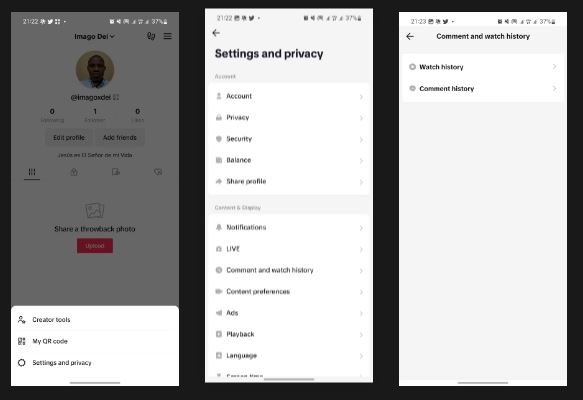
- Open TikTok and tap Profile, bottom right.
- Tap the three horizontal lines (the menu) in the top right corner.
- Tap Activity Centre — it has a clock icon.
- Tap Watch history, which is the first entry.
If Activity Centre is not on the menu directly, tap Settings and privacy first and look for it inside there. Which of the two layouts you get depends on your app version and region.
Videos are listed newest first. Tap any one to watch it again, or use the share arrow to save or send it.
Search within your history
Watch history has its own search box, which is the part most people miss. If you remember a word from the caption, the creator’s name or a sound, search inside the history rather than scrolling — six months of viewing is a very long list.
Find it on the desktop site
- Sign in at tiktok.com with the same account.
- Click your profile picture, top right.
- Choose Settings.
- Look for Activity centre or Watch history.
The desktop site does not always mirror every mobile feature. If the list looks short or incomplete, use the app — it holds the full record.
If the video is not in your history
Several things can leave a gap:
- It is older than about 180 days. History does not go back further.
- You watched it while signed out, or in a browser without signing in. Nothing is recorded against your account then.
- You were on a different account. History is per account, not per device.
- You cleared it, or used a privacy setting that stops history being kept.
Other places to look
Before giving up, try these — they are separate lists from watch history:
- Liked videos. Profile → the heart tab. If you liked it, it is here regardless of how long ago.
- Favourites. Profile → the bookmark tab, then Videos. This is the one to build the habit of using.
- Reposts. Anything you reposted stays on your profile.
- Comments you left. Activity Centre → Comment history. If you commented, this leads straight back to the video.
- Search history. Activity Centre → Search history. Not the video itself, but often the term that found it.
Request your data
If it matters enough, TikTok will give you a full export that reaches further back than the in-app list:
- Profile → menu → Settings and privacy → Account → Download your data.
- Choose All data and a file format — TXT is easiest to read, JSON is easier to search with a script.
- Request it, then come back in a few days for the download.
The export includes a browsing history file with timestamps and video links.
Clear your watch history
Same place: Activity Centre → Watch history. Tap Select to remove individual entries, or use the clear-all option to empty it.
Worth knowing: clearing the list removes what you can see. It does not reset the recommendation model, which is built from far more than the visible history. If your feed has gone somewhere you do not want it, use not interested on individual videos, or refresh the feed entirely from Settings and privacy → Content preferences.
Frequently asked questions
How far back does TikTok watch history go?
Roughly 180 days in the app. Older viewing is not shown, though some of it appears in a full data export.
Can I see videos I watched while logged out?
No. Watch history is tied to an account, so anything viewed signed out is not recorded anywhere you can reach.
Can someone else see my watch history?
No. It is private to your account and not visible to other users. Liked videos, by contrast, can be public depending on your privacy settings — check Settings and privacy → Privacy → Liked videos.
Why can I not find Activity Centre?
Either the app needs updating, or your version puts it inside Settings and privacy rather than on the top-level menu. Update first, then check both places.
Does clearing watch history change my For You feed?
Barely. The recommendation system draws on watch time, replays, shares and much else besides the list you can see. To change the feed, use not interested, follow and unfollow deliberately, or refresh your content preferences.
How do I stop losing videos in the first place?
Use Favourites — the bookmark icon on the right of any video. It takes one tap, it is private, and unlike watch history it does not expire.