TikTok drafts live inside the app, not on your phone. That is the whole problem: they are not files you can copy, back up or edit elsewhere, and they disappear if the app is uninstalled or its data is cleared.
There is a reliable way to get a draft into your camera roll without posting it publicly, and there is a quicker way that has one important limitation. This guide covers both.
Checked August 2026. TikTok’s menus move between app versions and regions. Where a step may differ, the alternative is noted.
Why drafts are not already on your phone
A draft is stored in TikTok’s own app storage as the pieces it was assembled from — clips, edits, text overlays, the chosen sound — not as a finished video. Nothing has been rendered yet.
The consequences are worth understanding before you rely on drafts:
- They do not sync between devices. A draft on your phone does not exist on your tablet.
- They are lost if you uninstall TikTok or clear its app data.
- They are not in your camera roll, so a phone backup does not include them.
- Some drafts expire after a period of inactivity.
If a draft matters, get it out of the app. That is what the rest of this guide does.
Method 1: Post it privately, then download
This is the reliable method. It produces the finished video exactly as it would appear — with sound, text and effects — and nobody sees it.
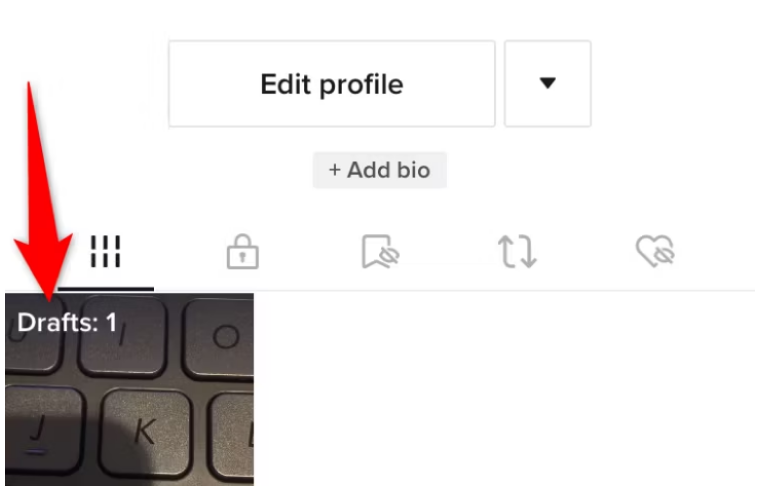
- Open TikTok and go to Profile.
- Tap the Drafts folder and choose the draft you want.
- Tap Next to reach the posting screen.
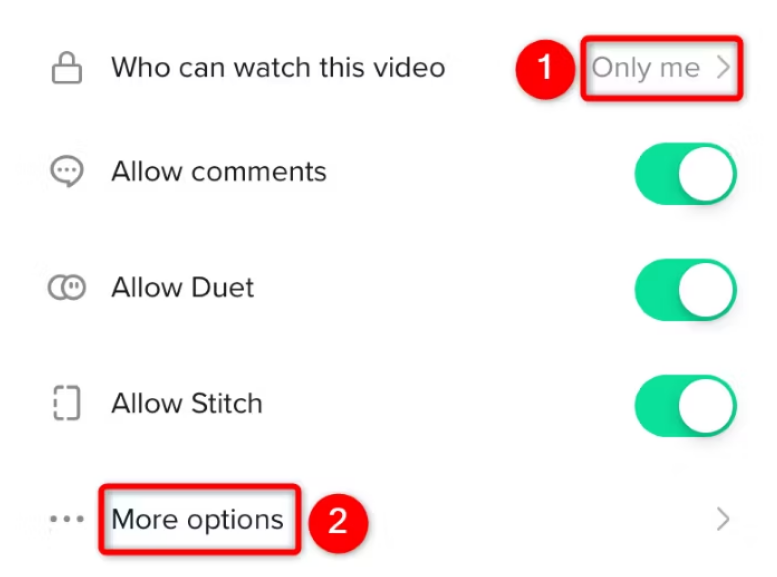
- Tap Who can watch this video and choose Only me.
- Turn off comments, Duet and Stitch while you are there — belt and braces.
- Tap Post. It appears on your profile with a padlock, visible only to you.
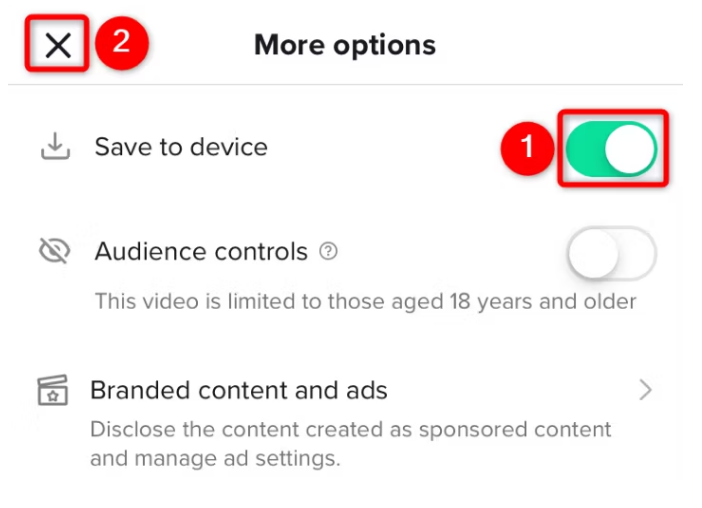
- Open the private post, tap the share arrow, and choose Save video.
- The video is written to your camera roll.
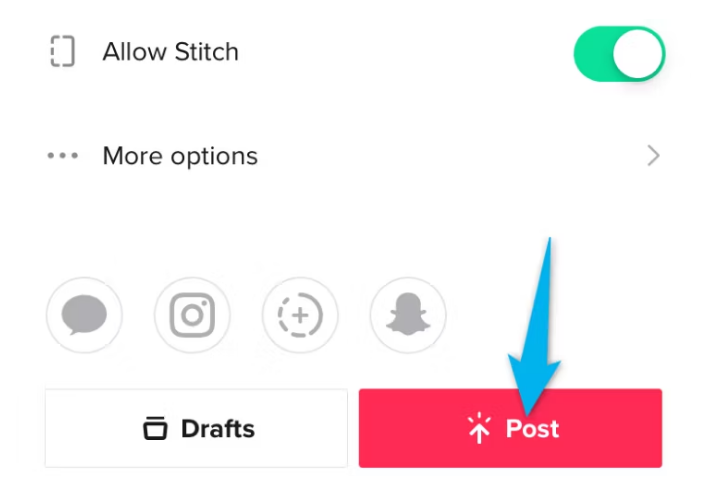
Once the file is safely in your gallery, delete the private post if you want to. The saved copy is unaffected.
If Save video is missing
Two common reasons:
- Downloads are switched off for your account. Go to Settings and privacy → Privacy → Downloads and turn it on.
- The sound is restricted. Some licensed music cannot be downloaded. Replace the sound with one that allows it, or record the audio separately.
Method 2: Save from the editor
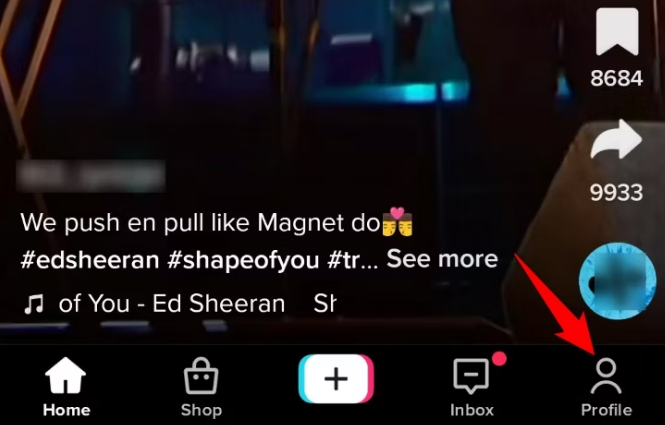
Some app versions offer a direct save without posting at all:
- Open the draft and tap Next to reach the posting screen.
- Look for More options.
- If Save to device or Save video is there, use it.
The limitation: saving this way sometimes exports the video without the licensed sound, and occasionally without text overlays and effects that are applied at publish time. Check what you get before deleting the draft. If anything is missing, use Method 1 — it always produces the finished version.
Method 3: Screen recording — last resort
If neither method works, record the screen while the draft previews. Expect lower quality, a fixed frame rate and possibly the interface in shot.
iPhone: add Screen Recording in Settings → Control Centre, then start it from Control Centre.
Android: screen recording is in the quick settings panel on most devices.
Use this only when the alternatives have failed. It is a copy of a preview, not an export.
Adding a saved video back into TikTok
Once a video is in your camera roll, you can bring it back in at any time:
- Tap + to create.
- Tap Upload next to the record button.
- Select the video and edit as normal.
Note that a video exported from a draft has its effects already baked in — you cannot un-apply them, only add more on top.
Managing and deleting drafts
To delete: open the Drafts folder, tap Select, choose the drafts, tap Delete.
Deleted drafts are gone permanently. There is no recycle bin and no recovery. Save anything you might want before deleting.
Frequently asked questions
Can I save a draft without posting it at all?
Sometimes — Method 2 does exactly that where your app version offers it. Where it does not, posting to Only me is the equivalent: nobody else can see it, and you can delete the post the moment the file is saved.
Will anyone see my video if I post it as Only me?
No. Only-me posts are not shown to followers, do not appear in the For You feed, and cannot be found by search. They carry a padlock on your own profile grid.
Can I save several drafts at once?
No. Each one has to be posted or exported individually.
Why is my saved video lower quality than in the app?
TikTok compresses on export, and some of the loss is unavoidable. It helps to upload over wi-fi rather than mobile data, and to turn on high-quality uploads if your app version offers the option.
Do drafts sync between my phone and tablet?
No. Drafts are stored on the device that created them. Signing in elsewhere will not bring them across, which is the main reason to export anything you care about.
I uninstalled TikTok. Can I get my drafts back?
Almost certainly not. Uninstalling clears the app’s local storage, and drafts are not backed up to TikTok’s servers. This is the failure mode the export methods above exist to prevent.