Most advice on this topic is either obvious or wrong. What follows is the part that is actually within your control, in the order it makes a difference — and an honest note about the part that is not.
1. Your first photo
This is not one factor among several. On a swiping app, the first photo is most of the decision, because it is most of what is on screen.
What consistently works:
- Your face, clearly visible, well lit. Natural daylight, no sunglasses, no hat brim shadow, no group.
- Alone. A group photo first means people either guess or move on. Save those for later slots.
- Reasonably close. Head and shoulders to waist up. A distant landscape shot with you in it does not work as a first photo.
- Genuine expression. A real smile reads differently from a posed one, and people are good at telling them apart.
- Recent. Within a year or two. Photos noticeably older than you set up an awkward first meeting.
The rest of the set
Aim for four to six, each doing a different job:
- Clear face shot
- Full body — its absence is noticed and assumed about
- Doing something you actually do, which gives people something to open with
- A social photo, showing you with friends
- Something with a bit of personality
Avoid: heavy filters, mirror selfies in cluttered rooms, photos with an ex cropped out, car selfies, and anything so blurry it could be anyone.
2. Your bio
Short and specific beats clever. The job of a bio is to give someone a reason to message you and something to message about.
Works: two or three concrete things, one of which invites a reply. “Currently failing to learn bouldering. Will travel for good dumplings. Ask me about my terrible taste in films.”
Does not work: “Just ask”, an empty bio, a list of what you do not want, height demands, or a paragraph about how much you hate the app.
3. Settings, which people forget
Frequently the actual cause of an empty queue:
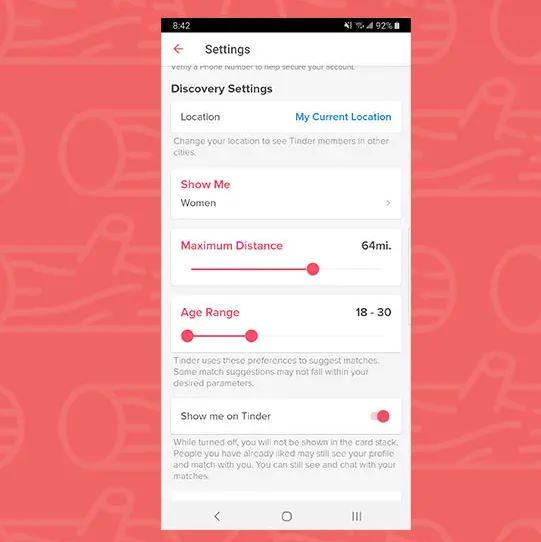
- Distance. Outside a large city, a narrow radius simply runs out of people. Widen it.
- Age range. A tight band cuts the pool sharply.
- Global mode is usually not what you want — matches you cannot meet.
- Check you are actually discoverable: Settings → Discovery. It can be switched off without you noticing.
4. How you swipe
Swiping right on everything is counterproductive. Apps track your ratio, and indiscriminate liking is read as low-signal — it tends to reduce how often you are shown to others.
Being selective, and spending a moment on profiles rather than swiping at speed, gives the system more to work with.
5. First messages
Matching is only half of it. What most reliably gets a reply:
- Reference something in their profile. It proves you looked, which is a low bar that most messages fail.
- Ask something answerable. “Hey” is not.
- Keep it short. Two sentences.
- Skip the compliment on appearance. They get many; it is not distinguishing.
- Suggest meeting within a few exchanges. Conversations that run for weeks usually go nowhere.
The honest part
Some of this is not within your control, and it is worth saying rather than implying otherwise.
- Results differ enormously by gender, age, location and population density. Identical advice produces very different outcomes.
- The apps are designed to be used, not completed. Paid features exist because the free experience is throttled.
- Volume is not the goal. A hundred matches you never message is worse than five conversations.
Avoid services selling likes, matches or “boosts” from outside the app. Nothing outside Tinder can add likes to your account. What those services actually do is take payment for nothing, or collect your login and take the account. The same applies to any site asking for your Tinder credentials for any reason.
Paid features: worth it?
| Feature | What it does | Worth it? |
|---|---|---|
| Unlimited likes | Removes the daily cap | Only if you were genuinely running out |
| See who likes you | Shows the list | Saves time; does not create matches |
| Boost | More visibility for 30 minutes | Marginal. Better photos help more |
| Super Likes | Signals stronger interest | Mixed; some find it off-putting |
| Rewind | Undo one swipe | Genuinely useful for accidents |
If your photos are weak, paying makes more people see weak photos. Fix the photos first.
Frequently asked questions
Does deleting and remaking my account help?
Rarely, and it costs your matches, conversations and any subscription — and Tinder may detect it as a recreation. See what actually happens when you restart a Tinder account.
Do I have to pay to get matches?
No. Paid features change visibility and convenience, not whether people like your profile. Photos and bio do that.
Does swiping right on everyone work?
No. It tends to reduce your visibility, because indiscriminate liking carries little signal.
How many photos should I have?
Four to six, each showing something different. One photo looks like an unfinished profile.
Is there a best time to use the app?
Activity peaks in the evening, especially Sunday. The effect is real but small — far smaller than your first photo.
Why did my matches suddenly stop?
Usually you have worked through the nearby population, particularly outside a city. Widen your distance and age range, refresh your photos, or try a different app.