Status, checked August 2026. KB5018411 was the October 2022 cumulative update for Windows 10 version 1607 and Windows Server 2016, taking those systems to OS Build 14393.5427. It has been superseded many times since. The live issue for anyone still running 1607 is that Windows 10 Enterprise LTSB 2016 reaches end of support on 13 October 2026, and Windows Server 2016 on 12 January 2027.
This page covers what KB5018411 changed, the known problems it shipped with, and — more usefully in 2026 — how to get a neglected 1607 machine current in one pass instead of chasing individual KB numbers.
What KB5018411 applied to
KB5018411 was released on 11 October 2022 for exactly two platforms:
- Windows 10, version 1607 — which by then meant Windows 10 Enterprise LTSB 2016 only
- Windows Server 2016, all editions
Consumer editions of 1607 had already been out of support since 9 April 2019, so if this update was offered to a machine, that machine was running LTSB or Server 2016.
What it fixed
October 2022 was a heavier release than most for this branch. The documented changes:
- Chile daylight saving time start date corrected.
- Dropped UDP packets in some virtual machines — a transmission fault that hit virtualised workloads specifically.
- A new Group Policy to turn Microsoft HTML Applications (MSHTA) on or off. HTA files are a well-worn malware delivery route, and being able to disable them by policy was the most useful security addition in the package.
- A fault stopping the primary AD FS node from registering or updating its heartbeat.
- Two robocopy faults when using the backup switch (
/B): one synchronising or migrating data to Azure Files, and one causing data loss against sources holding tiered files via Azure File Sync or Cloud Files. - Stop error 13A or C2 on SMB multichannel connections.
- A known issue producing empty shortcuts and zero-byte files when copying files through Group Policy Preferences — a fault that quietly corrupted deployments rather than announcing itself.
dfsutilfailing to remove a soft-link target from DFS with error codes0x000036F8and0x80070041.- High CPU on a file server when many programs opened the same handle type at once.
- A path allowing users to get past security filters in Windows Explorer under certain non-standard settings.
Alongside those, the package carried the month’s security fixes for the Windows App Platform and Frameworks, Windows Graphics, the Microsoft Scripting Engine, Windows Storage and Filesystems, the Windows Kernel, the Microsoft JET Database Engine, Microsoft Edge and Internet Explorer 11.
Known issues it shipped with
Two problems were widely reported after installing KB5018411:
- Longer shutdown times. Machines took noticeably longer to power off. This was resolved in later cumulative updates.
- Jordan time zone. Jordan moved permanently to UTC+3, and systems that had not taken the corresponding time zone data update showed the wrong local time. This is a data change rather than a bug, but it caught out scheduled tasks and log timestamps.
Both are moot on a machine that has been patched since — which is the point of the section below.
Do not install KB5018411 today
Windows cumulative updates are exactly that: cumulative. Every monthly package for a branch contains all of the fixes from every earlier package in that branch. Installing a three-year-old cumulative update on purpose achieves nothing that the current one does not, and on a very out-of-date machine it will simply waste an hour and a reboot.
The correct sequence for a 1607 machine that has fallen behind is:
- Install the latest servicing stack update (SSU) for 1607.
- Reboot.
- Install the latest cumulative update for 1607.
- Reboot.
Skipping step 1 is the single most common reason a cumulative update fails and rolls back on this branch. The servicing stack is the component that installs updates; if it is too old, it cannot install the new package.
How to check your build
- Press Win + R.
- Type
winverand press Enter.
You are looking for version 1607 and a build number beginning 14393. If the number after the dot is 5427 or higher, KB5018411 is already on the machine.
To see the update history from a script or a remote session:
Get-HotFix | Sort-Object InstalledOn -Descending | Select-Object HotFixID, InstalledOn -First 15Installing updates on 1607
Through Windows Update
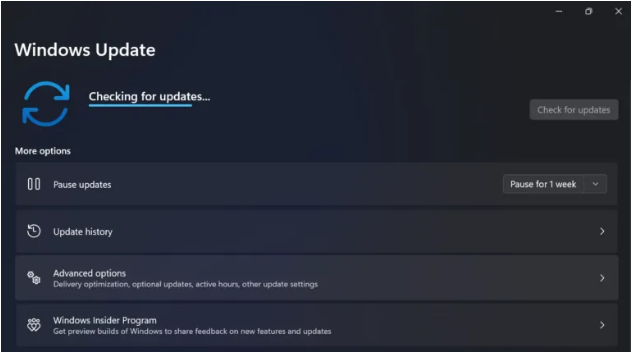
- Type Windows Update into the Start menu search box and open it, or press Win + I and go to Update & Security → Windows Update.
- Choose Check for updates.
- Install the cumulative update it offers and restart when asked.
From the Microsoft Update Catalog
Many LTSB and Server 2016 machines have no route to Windows Update at all, by design. For those:
- Open the Microsoft Update Catalog on a machine that does have internet access.
- Search for Cumulative Update for Windows 10 Version 1607 and sort by date to find the newest.
- Download the package matching the target machine’s architecture — x86 or x64. The catalog will not stop you downloading the wrong one.
- Transfer the
.msufile, run it, and reboot.
The x64 package for this branch is around 1.5 GB, and later ones are larger. Plan the transfer accordingly if you are working over a slow or metered link.
If the update fails
The usual causes, in the order worth checking:
- Servicing stack too old — install the latest SSU first.
- Not enough free disk space. Cumulative updates on 1607 want several gigabytes of working room.
- A corrupted component store. Run
DISM /Online /Cleanup-Image /RestoreHealthfollowed bysfc /scannowfrom an elevated Command Prompt, then retry. - Error
0x80070005, meaning access denied — see how to fix error code 0x80070005.
The deadline you should be planning around
Windows 10 Enterprise LTSB 2016 falls out of support on 13 October 2026, and Windows Server 2016 on 12 January 2027. The consumer Extended Security Updates programme does not cover LTSB. Organisations can buy paid ESU for LTSB 2016 for up to three years through Volume Licensing or a Cloud Solution Provider; without it, these machines simply stop receiving security fixes after that date.
If a 1607 machine cannot move — usually because a vendor will not certify their equipment on anything newer — the mitigation is isolation rather than patching: take it off any route to the internet, put it on its own network segment, and control what can be plugged into it.
Frequently asked questions
What build does KB5018411 install?
OS Build 14393.5427.
Is KB5018411 a security update?
It is a cumulative update, which bundles that month’s security fixes together with quality fixes. October 2022’s package included security updates for the kernel, graphics, storage, the scripting engine, Edge and Internet Explorer 11.
Why can I not find it in Windows Update?
Because it has been superseded. Windows Update only offers the current cumulative update for a branch; older ones remain available in the Microsoft Update Catalog for archival and offline use.
Does this update apply to Windows 10 22H2 or Windows 11?
No. Those branches received their own separate October 2022 updates under different KB numbers. A KB number always refers to one package for one servicing branch.