Status, checked August 2026. KB5021235 was the December 2022 cumulative update for Windows 10 version 1607 and Windows Server 2016 (OS Build 14393.5582). It is best remembered as the update that broke ODBC connections to SQL Server — a regression fixed the following month. It has long been superseded, and Windows 10 Enterprise LTSB 2016 reaches end of support on 13 October 2026.
If you are troubleshooting an old 1607 or Server 2016 machine, this is the update worth knowing about, because its side effect was more disruptive than anything it fixed. Here is what it did, what it broke, and how to tell whether a machine in front of you is still stuck on it.
What KB5021235 was
Released on 13 December 2022, KB5021235 was the monthly cumulative update for:
- Windows 10, version 1607 — in practice, Windows 10 Enterprise LTSB 2016
- Windows Server 2016
It took those systems to OS Build 14393.5582. Microsoft published limited detail on the security content, which is normal: fixes for actively exploitable flaws are described sparsely until the patch is widely deployed.

What it fixed
- A memory leak in LSASS on domain controllers. This is the significant one. The Local Security Authority Subsystem Service leaked memory on Windows domain controllers, and the leak was itself introduced by the updates released on 8 November 2022 or later. On a busy DC the symptom is gradual degradation and eventually a service restart or reboot — the kind of fault that gets blamed on hardware for weeks before anyone connects it to a patch.
- Fiji daylight saving time. Fiji suspended DST, and the time zone data was corrected to match.
- Security descriptor handling in the operating system. Microsoft gave no detail, which in context means a security fix held back deliberately.
The regression: ODBC connections to SQL Server
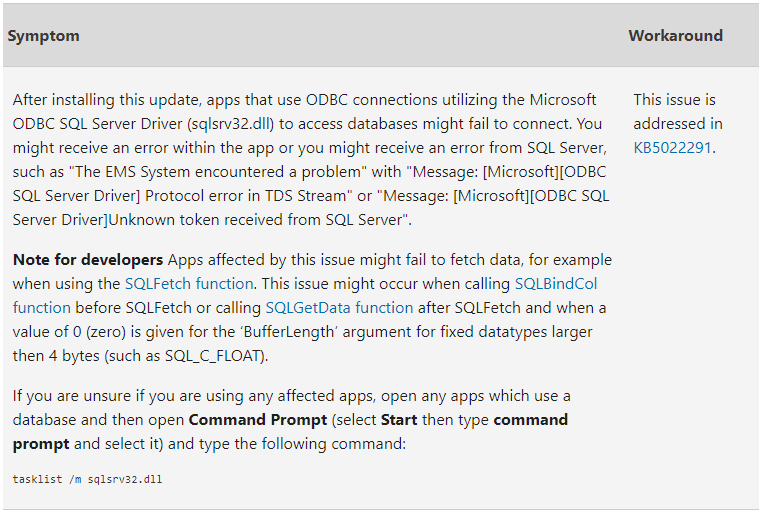
After installing KB5021235, applications that reached databases through an ODBC connection using the Microsoft ODBC SQL Server driver (sqlsrv32.dll) could fail to connect.
This mattered far more than it sounds. sqlsrv32.dll is the legacy driver, and legacy is exactly what runs on an LTSB machine: line-of-business applications written a decade ago, reporting tools, shop-floor terminals. Sites that had gone years without an application failure suddenly had one, caused by a security update they were right to install.
How to tell whether an application uses that driver
Open Command Prompt from the Start menu and run:
tasklist /m sqlsrv32.dllAny process listed is using the legacy driver and was exposed to the fault.
The fix
Microsoft resolved it in the following month’s cumulative update, KB5022289 (January 2023). The remedy was to move forward, not to roll KB5021235 back — rolling back would have re-opened the security holes it closed, including the LSASS leak fix.
That is the general shape of the right answer whenever a cumulative update causes a regression: wait for or install the next one. Uninstalling a cumulative update trades a known bug for a set of unknown vulnerabilities.
A note on Intel Atom Clover Trail
Around this release, support ended for PCs and devices built on Intel Atom Clover Trail processors. Those machines were pinned to older Windows 10 builds by a driver limitation Intel never resolved, and no amount of patching moves them forward. If you have one, it is hardware that has reached the end of its software life, not a machine with an update problem.
Should you install KB5021235 now?
No. Windows cumulative updates contain every fix from every earlier update in the same branch, so the current package already includes everything KB5021235 delivered — without its ODBC regression.
For a 1607 machine that has fallen behind, the sequence is:
- Install the latest servicing stack update (SSU) for version 1607.
- Reboot.
- Install the latest cumulative update for version 1607.
- Reboot and confirm the build with
winver.
Before starting, take a restore point — on a machine this old it is cheap insurance. See how to create a system restore point.
Where to get updates for 1607
Windows Update
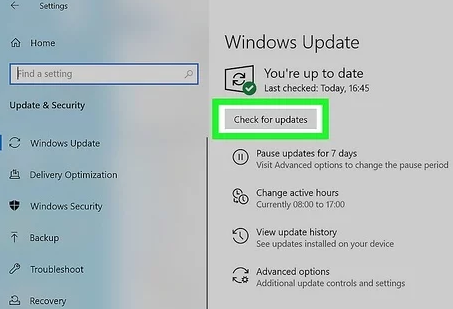
- Press Win + I to open Settings.
- Go to Update & Security → Windows Update.
- Choose Check for updates and install what it offers.
Microsoft Update Catalog
For machines with no route to Windows Update — the normal state for LTSB deployments — download the package manually from the Microsoft Update Catalog, match the architecture to the target machine, and run the .msu file. Expect roughly 1.5 GB for the x64 package, and more for the newest ones.
The deadline
Windows 10 Enterprise LTSB 2016 reaches end of support on 13 October 2026, and Windows Server 2016 follows on 12 January 2027. The consumer ESU programme does not cover LTSB, but organisations can buy paid Extended Security Updates for LTSB 2016 for up to three years through Volume Licensing or a Cloud Solution Provider. If you are running 1607 anywhere, those dates are now the planning constraint.
Frequently asked questions
What build number does KB5021235 correspond to?
OS Build 14393.5582, released 13 December 2022.
Should I uninstall KB5021235 if I hit the ODBC problem?
No. Install a newer cumulative update instead — KB5022289 or later. Uninstalling removes the security fixes as well as the regression, including the domain controller memory leak fix.
Does the ODBC problem affect the newer driver?
The reported fault was specific to the legacy sqlsrv32.dll driver. Applications using the newer Microsoft ODBC Driver for SQL Server were not the subject of this issue. Moving off the legacy driver is worth doing anyway — it has been deprecated for years.
Why is there so little detail in Microsoft’s changelog for this update?
Because the content was largely security fixes. Microsoft routinely withholds specifics until a patch has had time to deploy widely, so that the write-up does not become a guide to exploiting unpatched machines.