Both terms describe light behind a screen, and people use them interchangeably. They are not the same thing:
- Bias lighting is a constant, neutral light behind the display. Its purpose is reducing eye strain, and it works.
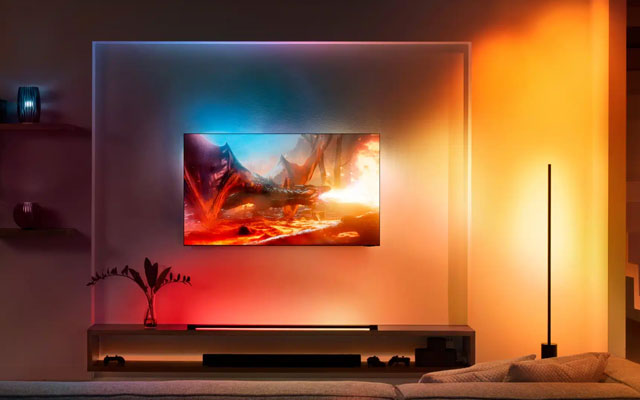
- Ambilight is Philips’ technology that projects colours matching what is on screen, changing in real time. Its purpose is immersion.
If you want your eyes to hurt less, you want bias lighting — and it costs very little.
Checked August 2026. Ambilight remains a Philips feature; third-party systems achieve similar effects by other means.
Why bias lighting helps
The mechanism is straightforward. In a dark room, a bright screen is surrounded by darkness, so your pupils constantly adjust between the two. That repeated adaptation is what produces tired, aching eyes after a long session.
A modest light behind the screen raises the surrounding brightness, so the contrast between screen and background is smaller and your eyes do less work.
There is a second benefit that surprises people: perceived contrast improves. A neutral reference behind the screen makes blacks look deeper, not washed out. This is why professional editing suites use a controlled surround.
Getting it right
- Colour temperature around 6500K. This is the standard white point displays are calibrated to. A warm or coloured light behind the screen distorts how you perceive colour on it.
- Brightness around 10% of the screen’s peak. It should be noticeable, not dominant.
- Behind the screen, aimed at the wall. Not pointed at you, and not visible directly.
- A pale, neutral wall works best. A strongly coloured wall tints the reflected light.
An LED strip along the back edges of the screen, powered from a USB port so it switches on with the display, does the job. It does not need to be expensive; it needs to be the right colour temperature.
What Ambilight is
Philips builds LEDs into the edges of the television. The set analyses what is on screen and projects matching colours onto the wall behind — a green field extends into green light, an explosion into orange.
Ambilight comes in configurations covering two, three or four sides of the panel, with four-sided being the most enveloping.
The effect is genuinely striking with films and games, and it makes the picture feel larger than it is. Whether it is worth paying for is a matter of taste — it is an immersion feature, not an eye-strain one, and its constantly shifting colour is a poorer reference for your eyes than a steady neutral light.
Alternatives to a Philips TV
| Approach | How it works | Trade-off |
|---|---|---|
| HDMI capture systems | A box sits between source and TV, reads the signal, drives LEDs | Most accurate; expensive; HDCP can block some sources |
| Camera-based systems | A camera watches the screen and matches colours | Works with any source including built-in apps; needs calibration; affected by room light |
| PC software | Reads the screen buffer and drives LEDs over USB | Cheapest and very accurate — but only for content on that PC |
| Plain bias lighting | A constant neutral strip | No colour matching; the only option that actually reduces eye strain |
The DIY route for a computer — a WLED-compatible LED strip with a small controller and open-source software — costs a fraction of a commercial system and works well, if you are comfortable with a little setup.
For a monitor rather than a TV
Bias lighting matters more at a desk than in a living room, because you sit closer and for longer.
- A USB-powered strip along the top rear edge of the monitor is enough.
- A monitor light bar sits on top and lights the desk rather than the wall — different purpose, also useful, and better if your monitor is not against a wall.
- Match it to your room lighting: a bias light does not replace having a lit room.
What actually reduces eye strain
Bias lighting is one part. The rest, roughly in order of effect:
- The 20-20-20 rule. Every 20 minutes, look at something 20 feet away for 20 seconds. Free, and the most effective single habit.
- Screen brightness matched to the room. Most people run displays far brighter than necessary in a dim room.
- Blink deliberately. Blink rate drops substantially when concentrating on a screen, and dry eyes account for much of what people call eye strain.
- Bias lighting.
- Distance and height. Arm’s length, top of the screen at or slightly below eye level.
Blue-light filters are widely sold for this. The evidence that they reduce eye strain is weak; a warmer screen in the evening may help sleep, which is a different claim.
Frequently asked questions
Is Ambilight worth it?
For immersion in films and games, many people find it is. For eye comfort specifically, a plain bias light does the job better and costs a fraction as much.
Can I add Ambilight to any TV?
Not the Philips feature itself, but third-party HDMI or camera-based systems produce a similar effect on any television.
What colour should bias lighting be?
Neutral white at about 6500K. Coloured light behind the screen distorts how you perceive colour on it.
Does bias lighting damage the TV?
No. An adhesive strip on the back is harmless, though it is worth avoiding vents on a set that runs warm.
Does it use much electricity?
Almost none. A USB-powered LED strip draws a few watts.
Do I still need a lit room?
Yes. Bias lighting reduces the contrast between screen and immediate surround; it does not replace general room lighting, and watching in an otherwise dark room is still harder on your eyes.