A PS5 that shuts itself off mid-game is almost always telling you one of three things: it is too hot, it is not getting stable power, or its system software has got into a bad state. Each has a distinct pattern, and identifying which one you have saves a lot of pointless troubleshooting.
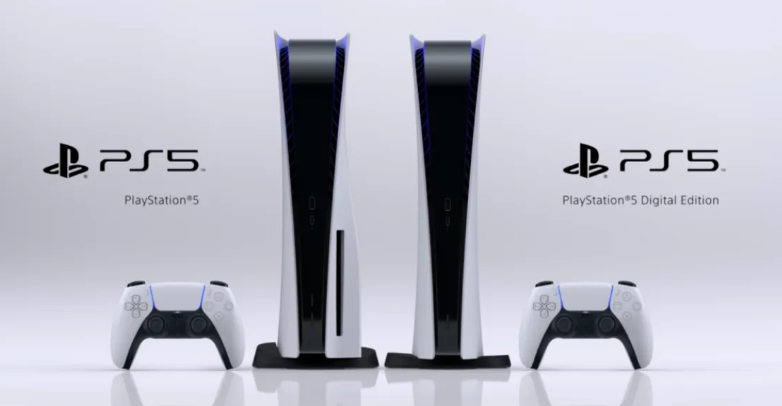
Checked August 2026. Applies to all PS5 models — the original disc and Digital editions, the Slim revision, and PS5 Pro. Where a model differs, it is noted.
Start with the pattern
| When it shuts down | Most likely cause | Go to |
|---|---|---|
| Only in demanding games, after 20–40 minutes | Overheating | Cooling and dust |
| Randomly, including in menus | Power delivery | Power and cabling |
| Beeps three times as it shuts off | Thermal protection | Cooling and dust |
| Every time you leave it in rest mode | Rest mode fault | Rest mode |
| After a system update | Software | Rebuild the database |
| Blue light flashes then off | Power supply or motherboard | When it is hardware |
1. Power and cabling
Cheap to check and a genuinely common cause.
- Plug the PS5 directly into a wall socket. Not an extension lead, not a surge strip shared with a heater or a monitor, not a cheap adapter. A console drawing 200 W or more on a strip with something else spiking is a classic random-shutdown scenario.
- Check the power cable at both ends. A slightly loose figure-8 connector will run fine at idle and drop out under load.
- Try a different socket on a different circuit if you can.
- If you use a UPS or a voltage regulator, bypass it temporarily. Some units interact badly with the PS5’s power supply.
2. Cooling and dust
The strongest signal here is timing: it runs fine for a while and then quits during something demanding. Add the three beeps on shutdown and it is thermal protection almost by definition.
Placement
- At least 10 cm of clear space on every side, and more behind the exhaust.
- Not inside a closed cabinet or shelf unit. This is the single most common cause of PS5 overheating.
- Not on carpet, which blocks the intake underneath.
- Vertical or horizontal is fine — both are supported, as long as the vents are clear.
Dust
The PS5 was designed to be cleaned, which is unusual and worth taking advantage of.
- Power off completely and unplug everything.
- Remove the side panels — they lift off with a firm pull at the corner, no tools needed.
- Use compressed air on the fan and the dust catchers. Short bursts, can upright, and hold the fan still so it cannot be spun up.
- Clear the two dust collection ports with a vacuum nozzle or compressed air.
- Refit the panels until they click.
Do this every six to twelve months, sooner in a dusty room or with pets in the house.
Do not let a vacuum nozzle touch the internals, and never open the console beyond the removable side panels while it is under warranty. Removing internal screws voids it.
3. Rest mode
Rest mode has been the cause of a long list of PS5 complaints, and it is easy to rule in or out: if the console only misbehaves after being left in rest mode, turn it off for a week and see.
- Settings → System → Power Saving → Set Time Until PS5 Enters Rest Mode.
- Set both During Media Playback and During Gameplay to Don’t Put in Rest Mode.
You lose background downloads and suspended games. If that fixes the shutdowns, the trade is worth it — and you can try re-enabling it after the next system update.
4. Update the system software
Firmware updates have fixed real shutdown and rest-mode faults over the console’s life.
Settings → System → System Software → System Software Update and Settings → Update System Software.
If the console shuts down before the update finishes, use safe mode instead — see below.
5. Rebuild the database
This clears a corrupted content database without deleting games or saves. It is safe, and it is the standard first software fix.
- Hold the power button until you hear two beeps — one immediately, one about seven seconds later — then release. The console boots into safe mode.
- Connect the controller with a USB cable and press PS. Bluetooth does not work in safe mode.
- Choose Clear Cache and Rebuild Database.
- Choose Rebuild Database.
It takes anywhere from a few minutes to an hour depending on how much is installed. Nothing is deleted.
6. Check the storage
If you have fitted an M.2 SSD, remove it and test without it. An incompatible or inadequately cooled drive causes shutdowns that look exactly like overheating.
The requirements are specific: PCIe Gen4 M.2 NVMe, and a heatsink. A drive without a heatsink will throttle and can take the console down with it.
7. Reset the console
If nothing above helps, and before assuming hardware:
- Back up your saves — cloud storage with PlayStation Plus, or to a USB drive via Settings → Saved Data.
- Boot into safe mode as described above.
- Choose Reset PS5, or Reset PS5 (Reinstall System Software) for a complete reinstall.
The full reinstall needs a USB drive with the PS5 system software on it, so read Sony’s instructions before starting rather than halfway through.
When it is hardware
Symptoms that point at a component fault rather than anything you can fix:
- Shuts down within seconds of powering on, before reaching the menu.
- Blue light flashes and then it dies — a long-standing indicator of a power supply or motherboard fault.
- Will not power on at all after a shutdown, until left unplugged for a while.
- Shuts down in safe mode, where almost nothing is running.
- Loud grinding or rattling from the fan, or no fan noise at all.
These need a repair. Check the warranty first — a PS5 that fails this way inside its warranty period should be a straightforward replacement.
Frequently asked questions
Why does my PS5 turn itself on by itself?
Usually HDMI-CEC: switching on the TV wakes the console. Turn it off with Settings → System → HDMI → Enable HDMI Device Link. A controller left charging on a USB port, or a stuck PS button, can do it too.
What do three beeps mean?
Thermal shutdown. The console got too hot and cut power to protect itself. Check placement and dust before anything else.
Can a bad power outlet cause this?
Yes. Unstable mains, an overloaded circuit or a worn socket all produce random shutdowns. Try a different socket on a different circuit — it is a two-minute test that rules out a whole category.
Will rebuilding the database delete my games or saves?
No. It rebuilds the index of what is installed. Games, saves and settings are untouched. A reset is the destructive operation, not a rebuild.
Is the PS5 Slim or Pro less prone to this?
The revisions run cooler and draw less power at the same workload, which helps, but the underlying causes are the same — a Pro in a closed cabinet will overheat just as reliably.
Does an M.2 SSD cause shutdowns?
It can, if it lacks a heatsink or is not PCIe Gen4 NVMe. Remove it and test without it before spending money on anything else.