Status, checked August 2026. Windows 11 23H2 is no longer current, and is out of support for Home and Pro since 11 November 2025. Enterprise and Education editions are supported until 10 November 2026. The current release is 25H2. If a machine is still on 23H2 Home or Pro, it has not received a security update in months — that is the thing to act on, not the feature list below.
KB5027397 was the enablement package that turned Windows 11 22H2 into 23H2 in late 2023. This page records what that update contained and — more usefully now — how to check where your machine actually is and get it current.
Check which version you are on
- Press Win + R.
- Type
winverand press Enter.
| Version | Build family | Support status (August 2026) |
|---|---|---|
| Windows 11 25H2 | 26200 | Current release |
| Windows 11 24H2 | 26100 | Home and Pro until 13 October 2026 |
| Windows 11 23H2 | 22631 | Home and Pro ended 11 November 2025; Enterprise and Education until 10 November 2026 |
| Windows 11 22H2 | 22621 | Out of support on every edition |
What was in 23H2
Nearly all of it is now simply part of Windows, so this is history rather than a reason to install anything.
File Explorer
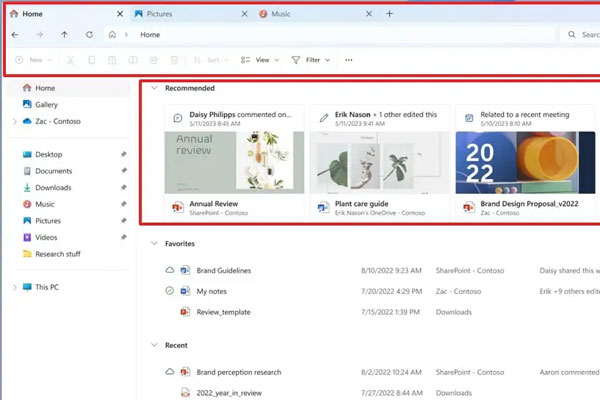
The visible redesign: a modernised layout, a details pane showing file information and activity, and a gallery view for photos organised by date. Tabs, introduced earlier in 22H2, stayed.
Copilot on the taskbar
Windows Copilot arrived as a side panel opened with Win + C. It has changed substantially since — see using Microsoft Copilot on Windows 11 for how it works now.
Other changes
- Volume mixer reachable from the taskbar with per-app control
- Native RAR, 7-Zip and tar support in File Explorer — no third-party tool needed to open common archive formats
- Dynamic Lighting, controlling RGB peripherals from Windows Settings instead of each vendor’s own utility
- Windows Backup as a first-party app for moving to a new PC
- Passkey support in Windows Hello
- A redesigned Settings home page
How enablement packages work
Worth understanding, because it explains why 23H2 installed in minutes when a feature update normally takes an hour.
22H2 and 23H2 share the same servicing branch. The features for 23H2 were already present in monthly updates to 22H2, switched off. KB5027397 was an enablement package: a tiny update that flipped the switch and changed the version number.
Practical consequences: it installed in a couple of minutes with one restart, and it needed the machine to be reasonably up to date on 22H2 first.
24H2 and 25H2 are not on that branch, so upgrading from 23H2 to a current version is a full feature update rather than a switch.
Getting current
If you are on 23H2 or earlier:
- Settings → Windows Update → Check for updates.
- Install everything offered, and check again after each restart — machines several versions behind usually need more than one pass.
- If no feature update appears, use the Windows 11 Installation Assistant, or mount the current ISO and run
setup.exe. See how to download the Windows 11 ISO.
Take a restore point first on a machine that has not been updated in a long time.
If the upgrade is refused
- Hardware requirements — see “this PC can’t run Windows 11”. A machine on 23H2 already meets them, so this usually means TPM or Secure Boot was switched off in firmware.
- Disk space — 20–30 GB free. See how to free up space.
- A specific error code — the code is far more useful than the version number. See 0x80072F8F – 0x20000.
Frequently asked questions
Should I install 23H2 now?
No. It is out of support for Home and Pro. Go to the current release instead.
What is KB5027397?
The enablement package that moved Windows 11 22H2 to 23H2 by activating features already present on the machine.
Why did 23H2 install so quickly?
Because it was a switch rather than an installation. The code had already arrived through monthly updates to 22H2.
Is 24H2 or 25H2 also an enablement package?
No. Both are on a different branch, so moving from 23H2 is a full feature update — expect it to take considerably longer.
My machine says 23H2 and gets no updates.
Expected, on Home or Pro. Servicing ended on 11 November 2025. Upgrade to a current version to start receiving security updates again.