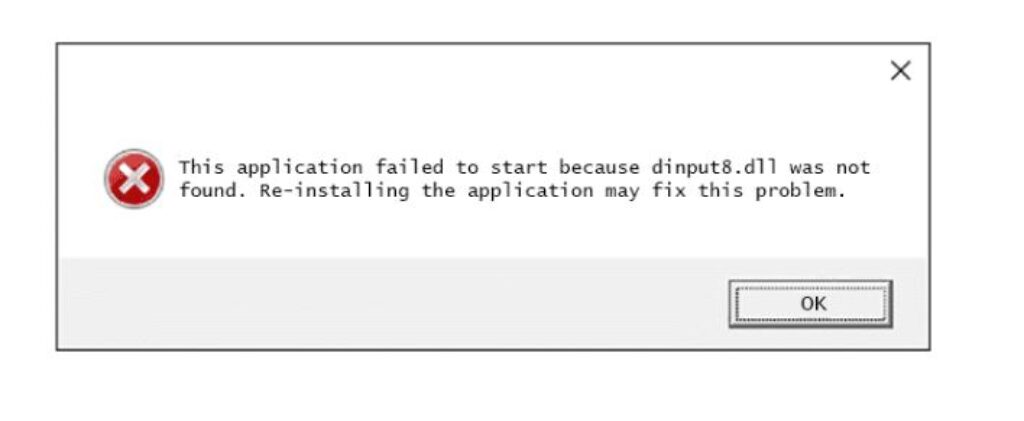
dinput8.dll is DirectInput 8, a Windows component that handles keyboards, mice, gamepads and joysticks for games. When an application reports it as missing or damaged, the file itself is almost never the actual problem.
Do not download dinput8.dll from a “DLL download” website. This is the single most important thing on this page. Those sites are a long-established malware distribution channel, the files are unsigned, and a genuine Windows DLL cannot be fixed by dropping a stranger’s copy into your system folder. Every legitimate fix below gets the file from Microsoft or from the game.
Checked August 2026. Applies to Windows 11 and Windows 10 22H2.
What is really going on
dinput8.dll ships with Windows and lives in two places on a 64-bit system:
C:\Windows\System32\— the 64-bit copyC:\Windows\SysWOW64\— the 32-bit copy, used by 32-bit games
Both are present on every healthy install. So when a game says it is missing, the likely explanations are:
- A mod or wrapper is involved. Many game mods ship their own
dinput8.dllin the game folder to hook input. If that file is the wrong version, corrupted, or blocked by antivirus, you get this error — and it is not Windows’ file at all. - The DirectX End-User Runtime is missing. Older games depend on legacy DirectX components that Windows does not install by default.
- Antivirus quarantined it. Because mods use this filename to hook processes, security software flags it routinely.
- The game installation is damaged.
- System file corruption — the least common, but easy to check.
1. Check the game folder first
Look for dinput8.dll in the game’s own directory, alongside the executable.
If one is there, it belongs to a mod or a wrapper — not to Windows. Options:
- Rename it to
dinput8.dll.bakand start the game. If it launches, that file was the problem. - Re-download the mod from its original source and replace it.
- Check your antivirus quarantine — it may have removed it.
This resolves the great majority of cases, and it is the step most guides omit entirely.
2. Install the DirectX End-User Runtime
Windows includes DirectX, but not the legacy redistributable components that older games need. This is a genuine, official download:
- Get the DirectX End-User Runtime Web Installer from Microsoft.
- Run it and restart.
It adds the older components without touching your current DirectX version.
3. Verify the game files
Every major launcher can repair its own installation:
- Steam: right-click the game → Properties → Installed Files → Verify integrity of game files.
- Epic Games: the three dots under the game → Manage → Verify.
- EA app / Ubisoft Connect / GOG Galaxy: each has a repair or verify option in the game’s settings.
4. Check the antivirus quarantine
Open your security software’s quarantine or protection history and look for anything named dinput8.dll.
If it is there and it came from a mod you deliberately installed, restore it and add an exclusion for the game folder. If you do not recognise it, leave it quarantined — this filename is also used by things that are not mods.
5. Repair Windows’ own copy
Only if the file is genuinely missing from the system folders. From an elevated Command Prompt:
DISM /Online /Cleanup-Image /RestoreHealth
sfc /scannow
SFC replaces missing or altered system files with correct copies from the component store. This is the supported way to restore a Windows DLL — and it takes the file from Microsoft’s own cache, not from the internet.
6. Install the Visual C++ redistributables
Games frequently depend on these, and a missing one produces DLL errors that name unrelated files.
Install the latest Microsoft Visual C++ Redistributable — both x86 and x64 — from Microsoft.
7. Check compatibility for very old games
For games from the DirectInput era:
- Right-click the game’s
.exe→ Properties → Compatibility. - Tick Run this program in compatibility mode for and choose an older Windows version.
- Tick Run this program as an administrator.
In order, what to try
- Look for
dinput8.dllin the game folder; rename it and test. - Check the antivirus quarantine.
- Install the DirectX End-User Runtime.
- Verify the game files through the launcher.
- Run DISM and SFC.
- Install the Visual C++ redistributables.
- Try compatibility mode for older titles.
Frequently asked questions
Can I just download the DLL?
No. DLL download sites are a malware channel, and the file they give you is unsigned and often the wrong version. Use SFC to restore Windows’ copy, or the DirectX runtime installer.
Why does my antivirus flag dinput8.dll?
Because mods use this filename to hook into games, and so does software that is not a mod. The detection is about the technique, not the name. If you installed the mod deliberately and trust its source, restore it and exclude the folder.
Is dinput8.dll a virus?
The genuine Windows file in System32 or SysWOW64 is not. A copy sitting in a game folder is a mod or wrapper — legitimate or otherwise, depending on where you got it. Anything in a temp folder or your user profile is worth scanning.
The game worked yesterday.
Check the antivirus quarantine first, then whether the game or a mod updated. A game update frequently breaks a mod that was hooking it.
Should I use a DLL fixer tool?
No. That entire category ranges from useless to malicious. Everything genuinely needed here comes from Microsoft, from the game’s launcher, or from the mod’s own source.