Status, checked August 2026. KB5032288 was a preview update for Windows 11 22H2 and 23H2, released in November 2023. It has been superseded many times, and the branches it targeted have moved on — 22H2 is out of support entirely, and 23H2 left support for Home and Pro on 11 November 2025. There is no reason to seek this package out; the current cumulative update contains everything it did.
This page records what KB5032288 changed, and covers the thing people are usually actually looking for when they land here: how to fix Copilot when it misbehaves today.
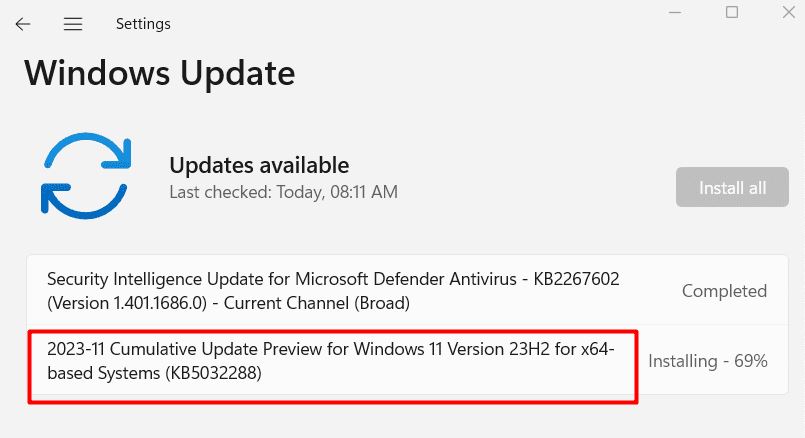
What KB5032288 was
An optional preview update — the kind Microsoft ships in the last week of a month for anyone who chooses to install it early. The same fixes reached everyone in the following month’s Patch Tuesday release.
Its headline items concerned Copilot, which had only recently arrived on the taskbar:
- Copilot failing to open, or opening as a blank panel
- The taskbar icon not appearing on some configurations
- Copilot behaving incorrectly across multiple monitors
- Focus and keyboard handling problems in the Copilot panel
Alongside those it carried the usual mix of File Explorer, taskbar and Settings fixes.
Preview updates, briefly
| Preview update | Patch Tuesday | |
|---|---|---|
| When | Last week of the month | Second Tuesday |
| Contains security fixes | No | Yes |
| Installed automatically | No — you choose it | Yes |
| Worth installing | Only to get a specific fix early | Always |
On a machine you rely on, skip previews. The fixes arrive a fortnight later, tested by everyone who did not.
Fixing Copilot today
Copilot has changed a great deal since 2023 — it is now an app rather than a docked side panel, and the taskbar behaviour differs. The fixes below apply to the current version.
1. Update Windows
Settings → Windows Update → Check for updates. Copilot problems on an out-of-date build are usually fixed by being up to date, not by any specific KB.
2. Update the app itself
Copilot updates through the Microsoft Store independently of Windows:
- Open the Microsoft Store.
- Select Library.
- Choose Get updates.
3. Repair or reset it
- Settings → Apps → Installed apps.
- Find Copilot, open the three-dot menu → Advanced options.
- Try Repair first — it preserves your data.
- If that does not help, use Reset.
4. Check regional availability and account
Copilot is not available in every region, and some features need a signed-in Microsoft account. Check Settings → Time & language → Language & region → Country or region.
On a work or school device it may be disabled by policy, which no local change will override.
5. Re-register the app
If it will not start at all, from an elevated PowerShell:
Get-AppxPackage -AllUsers *Copilot* | Foreach {Add-AppxPackage -DisableDevelopmentMode -Register "$($_.InstallLocation)\AppXManifest.xml"}If that returns nothing, install Copilot from the Microsoft Store.
6. Check the taskbar setting
Settings → Personalisation → Taskbar → make sure Copilot is turned on.
Installing a specific KB by hand
If you genuinely need one particular package — for testing, or on an isolated machine:
- Search for the KB number in the Microsoft Update Catalog.
- Match your Windows version and architecture.
- Run the downloaded
.msu.
For a machine that is simply behind, install the current cumulative update instead — it contains every earlier fix, and installing an old one leaves you exposed to everything patched since.
Frequently asked questions
Should I install KB5032288?
No. It is a superseded preview update for branches that are out of support. Install the current cumulative update for your Windows version.
What is a preview update?
An optional, non-security release in the last week of the month, offering fixes early. Its contents ship to everyone in the next Patch Tuesday update.
Why can I not find it in Windows Update?
Preview updates are only offered while current, and only if you opt in. Once superseded they are available in the Microsoft Update Catalog and nowhere else.
Copilot disappeared from my taskbar.
Check Settings → Personalisation → Taskbar, then confirm the app is still installed under Apps → Installed apps. Microsoft has also changed how Copilot is presented more than once, so its behaviour may simply differ from what you remember.
Do preview updates cause problems?
Sometimes — that is what the preview period is for. On a machine you depend on, wait for the Patch Tuesday release.