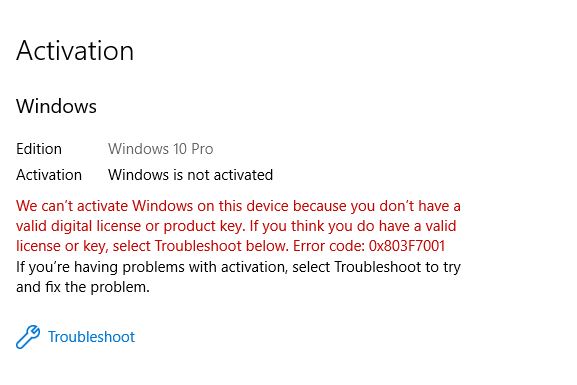
Activation error 0x803F7001 means Windows looked for a licence for this hardware and did not find one. The most common cause is not piracy — it is a hardware change, usually a new motherboard or a replaced drive, which makes Windows treat the machine as a different computer.
Checked August 2026. Applies to Windows 11 and Windows 10 22H2. Windows 10 is out of support as of 14 October 2025 — if you are activating a Windows 10 machine, plan the move to Windows 11 as well.
How Windows activation actually works
Understanding this makes the fixes obvious rather than magical.
When Windows is activated, Microsoft records a digital licence tied to a hardware fingerprint of that machine. Reinstall Windows on the same hardware and it reactivates silently — there is no key to type, because the licence is recognised from the hardware.
Change the hardware significantly and the fingerprint no longer matches. The motherboard carries the most weight, which is why a board replacement almost always triggers this error.
1. Rule out the trivial causes
Before anything else:
- Wait, and check your connection. Activation needs to reach Microsoft’s servers. A VPN, a corporate proxy or a filtered DNS can block it. Disconnect any VPN and try again.
- Check the system clock. A wrong date breaks the certificate validation that activation depends on. Settings → Time & language → Date & time → Sync now.
- Install pending updates, then restart. Activation sometimes completes on its own afterwards.
2. Run the Activation troubleshooter
This is the fix for the hardware-change case, and it works more often than people expect.
- Settings → System → Activation.
- Select Troubleshoot. (It only appears when Windows is not activated.)
- If the troubleshooter offers I changed hardware on this device recently, choose it.
- Sign in with the Microsoft account that was linked to the device before the change.
- Pick the device from the list and select Activate.
This only works if the digital licence was linked to a Microsoft account before the hardware changed. If you were using a local account, there is nothing for the troubleshooter to match against. Link the account now on any machine you might upgrade later: Settings → Accounts → Your info → Sign in with a Microsoft account instead.
3. Check what Windows thinks your licence is
From an elevated Command Prompt:
slmgr /dlvA dialog reports the licence status, the channel (Retail, OEM or Volume) and the last five characters of the installed key. The channel matters:
- Retail — can be moved to different hardware.
- OEM — tied to the machine it shipped with. A motherboard replacement legitimately ends its life, other than a like-for-like warranty repair.
- Volume — managed by an organisation; talk to IT rather than troubleshooting it yourself.
To see the key embedded in the firmware, which many prebuilt PCs and laptops have:
wmic path softwarelicensingservice get OA3xOriginalProductKeyNote: wmic has now been removed from current Windows. The PowerShell equivalent:
(Get-CimInstance -ClassName SoftwareLicensingService).OA3xOriginalProductKeyIf that returns a key, the machine has a firmware licence and should activate automatically. A blank result means there is none, which is normal for a self-built PC.
4. Re-enter the product key
If you have a legitimate key — from a retail purchase, or a sticker on an older machine:
Settings → System → Activation → Change product key.
Or from an elevated Command Prompt:
slmgr /ipk XXXXX-XXXXX-XXXXX-XXXXX-XXXXX
slmgr /ato
5. Check you installed the right edition
A Home key will not activate Pro, and vice versa. Clean installs frequently default to the wrong edition.
Check under Settings → System → About. If the edition is wrong, Change product key with the correct key will switch editions in place — no reinstall needed.
6. Reset the licensing state
A last resort before contacting support. From an elevated Command Prompt:
slmgr /upk
slmgr /cpky
slmgr /rearm
Then restart and re-enter your key.
/upk uninstalls the current product key. Do not run this unless you have a key to put back, or a digital licence linked to a Microsoft account. Removing the key on a machine you cannot reactivate leaves you worse off than the error did.
7. Contact Microsoft support
Genuinely the right step for hardware changes on a Retail licence, and it works — support can reissue activation for a legitimate licence that the automated system rejects. Have ready: your proof of purchase, the product key if you have one, and what changed on the machine.
A note on “cheap Windows keys”
Keys sold for a few pounds on marketplace sites are usually volume-licence keys diverted from organisations, or keys already used elsewhere. They activate for a while and then stop, producing exactly this error. There is no support, no refund, and reactivating means buying again.
Also worth stating plainly: activation “tools” that patch system files are malware distribution channels far more often than they are activation tools.
Frequently asked questions
What does 0x803F7001 mean?
Windows could not find a valid licence for this device. Usually the hardware fingerprint no longer matches the recorded digital licence, most often after a motherboard change.
Will I lose my files if Windows is not activated?
No. Unactivated Windows keeps working: you lose personalisation settings, get a watermark in the corner, and see periodic reminders. Security updates continue.
I replaced my hard drive and now it will not activate.
A drive change alone does not usually break the fingerprint, but combined with other changes it can. Run the Activation troubleshooter and choose the hardware-change option.
Does upgrading from Windows 10 to Windows 11 need a new key?
No. An activated Windows 10 machine keeps its digital licence through the upgrade.
I bought a laptop with no key sticker.
Modern machines store the key in firmware rather than on a label. Use the PowerShell command above to read it.