Status, checked August 2026. KB5022289 was the January 2023 cumulative update for Windows 10 version 1607 and Windows Server 2016. It has been superseded many times over — you do not need to hunt for it, because every cumulative update released since then already contains it. What matters far more if you are still on 1607: Windows 10 Enterprise LTSB 2016 reaches end of support on 13 October 2026, which is weeks away.
If you have landed here because Windows Update offered you KB5022289, because an audit report flagged it, or because you are trying to work out what “OS Build 14393” means on a machine you have just inherited, this page explains what that update was, whether it still matters, and what you should actually do with the machine in front of you.
What KB5022289 was
KB5022289 was released on 10 January 2023 as the monthly cumulative update for a single, specific platform:
- Windows 10, version 1607 (the 2016 Anniversary Update, which survives today only as Windows 10 Enterprise LTSB 2016)
- Windows Server 2016
It is worth being precise about this, because it is widely misreported: KB5022289 was not a general update for “all versions of Windows”. Windows 11, Windows 10 22H2 and every other branch received their own separate January 2023 updates with different KB numbers. A KB number identifies one package for one servicing branch.
Installing it took the machine to OS Build 14393.5648.
Is this update still relevant in 2026?
Only as history, with one important exception.
Windows updates are cumulative. Each month’s package contains every fix from every previous month in that branch. So if a 1607 machine has had any update since January 2023, it already has everything KB5022289 delivered, and installing the old package on purpose does nothing.
The exception is a machine that has genuinely been offline or unpatched since 2022. Those exist — LTSB 2016 is used precisely because it sits in places that do not get touched: manufacturing lines, medical equipment, kiosks, test rigs. On a machine like that, the correct move is still not KB5022289. It is the latest cumulative update for 1607, which will bring it forward in one step.
The date that actually matters
Windows 10 Enterprise LTSB 2016 reaches the end of its support lifecycle on 13 October 2026, and Windows Server 2016 follows on 12 January 2027. The consumer Extended Security Updates programme does not cover LTSB. Organisations can buy paid ESU for LTSB 2016 for up to three years through Volume Licensing or a Cloud Solution Provider; without it, a 1607 machine stops receiving security updates on that date.
That is a much more urgent thing to know than anything in a January 2023 changelog. If you are administering 1607 machines, the migration question is now the only question.
What KB5022289 fixed
The January 2023 package was mostly a security update. The changes that were documented:
- An authentication failure that occurred when the upper 16 bits of the
msDS-SupportedEncryptionTypesattribute were set. It affected domains where the RC4 encryption type had been disabled, or where encryption types had not been set at all — a configuration many organisations had just moved to. - A failure to reset passwords on virtual computer objects (VCO) and cluster name objects (CNO), which returned error
0x80070005. - A connection fault in applications reaching databases through the SQL Server ODBC driver (
sqlsrv32.dll). This was itself a regression introduced by the December 2022 update, KB5021235 — KB5022289 was the fix for it. - The Quick Assist app was made available on client devices.
- A new Group Policy was added to enable or disable HTML Application (HTA) files. HTA files are a long-standing malware delivery route, so being able to switch them off centrally was the practical security win in this release.
About error 0x80070005
Two of the fixes above surface as 0x80070005, which is simply the Windows code for “Access Denied” — the caller does not have the permissions the operation needs. It is a generic code, not a KB5022289-specific one, and it turns up in dozens of unrelated situations. We cover it separately in How to fix error code 0x80070005.
Download size
| Package | Architecture | Size |
|---|---|---|
| 2023-01 Cumulative Update for Windows 10 Version 1607 (KB5022289) | x86 | 837.3 MB |
| 2023-01 Cumulative Update for Windows 10 Version 1607 (KB5022289) | x64 | 1551.4 MB |
Cumulative updates for 1607 are large because each one carries the full accumulated payload since 2016. Later packages are larger still — budget for well over 2 GB and a long install on older hardware.
How to check which build you are on
Before installing anything, find out where the machine actually is:
- Press Win + R.
- Type
winverand press Enter.
The dialog reports the version (1607) and the build. If the number after 14393 is 5648 or higher, KB5022289 is already installed and there is nothing to do.
For a full list of what is installed, run this in an elevated PowerShell window:
Get-HotFix | Sort-Object InstalledOn -Descending | Select-Object -First 10How to install updates on 1607 manually
The normal route is Windows Update:
- Open Settings with Win + I.
- Go to Update & Security → Windows Update.
- Choose Check for updates and let it install whatever it finds.
If the machine is not managed by Windows Update — which is common for LTSB devices behind a WSUS server or with no internet route at all — download the package by hand:
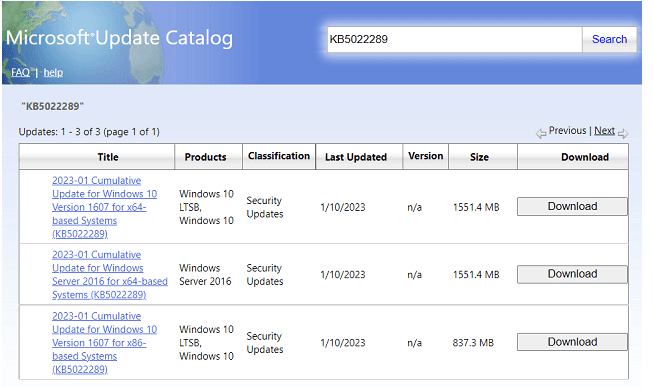
- Go to the Microsoft Update Catalog.
- Search for the KB number, or for Cumulative Update for Windows 10 Version 1607 to find the newest one.
- Match the architecture (x86 or x64) to the machine — the catalog will happily let you download the wrong one.
- Run the downloaded
.msufile and reboot when prompted.
Install the servicing stack update first
Cumulative updates on 1607 will refuse to install, or fail and roll back, if the servicing stack is too old. If a cumulative update fails, install the latest servicing stack update (SSU) for 1607 from the same catalog first, reboot, then retry. This trips up almost everyone patching a long-neglected 1607 machine for the first time.
What to do now
If you are reading this in 2026 with a 1607 machine in front of you, the useful sequence is:
- Establish the build with
winver. - Patch to current — latest SSU, then latest cumulative update. Not KB5022289.
- Plan the migration. LTSB 2016 support ends 13 October 2026, Server 2016 support on 12 January 2027. For LTSB/LTSC deployments the successor is Windows 11 Enterprise LTSC 2024; for Windows Server 2016, it is a newer Server release.
- If migration is genuinely impossible — an appliance the vendor will not certify on anything newer is the usual reason — then isolate it: no internet route, segmented network, restricted removable media. An unpatched machine on a flat network is the problem, not an unpatched machine as such.
Frequently asked questions
Does KB5022289 apply to Windows 11, Windows 8 or Windows 7?
No. It applies only to Windows 10 version 1607 and Windows Server 2016. Every servicing branch gets its own KB number for the same month.
I cannot find KB5022289 in Windows Update. Is something wrong?
No — that is expected. Superseded updates are withdrawn from Windows Update, because the newer cumulative update already contains them. You will only find it in the Microsoft Update Catalog.
Can I uninstall it?
Cumulative updates can be removed with wusa /uninstall /kb:5022289, but on a machine that has installed anything since, this will do nothing useful — you would be removing a package that a later one has already replaced. Rolling a cumulative update back is rarely the right fix; identifying which specific change broke something usually is.
Is Windows 10 1607 still receiving updates?
Yes, but only for Windows 10 Enterprise LTSB 2016 (until 13 October 2026) and Windows Server 2016 (until 12 January 2027). Consumer editions of 1607 — Home and Pro — lost support back on 9 April 2019.