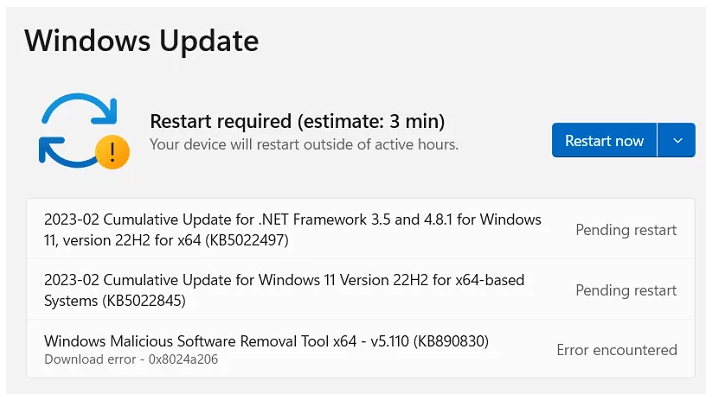
Status, checked August 2026. KB5022845 and KB5022836 were the February 2023 Patch Tuesday updates for Windows 11 22H2 and 21H2. Both of those branches are now out of support on every edition — 21H2 ended in October 2023, 22H2 in October 2025. If a machine is still on either, no security update has reached it in a long time. The current release is Windows 11 25H2.
These two KB numbers still turn up in inventory reports and compliance scans, usually attached to a machine nobody has looked at in a while. This page explains what each one was, and — the part that matters now — how to work out whether the machine reporting it is still receiving updates at all.
The two updates at a glance
| Update | Windows 11 version | OS Build | Released |
|---|---|---|---|
| KB5022845 | 22H2 | 22621.1265 | 14 February 2023 |
| KB5022836 | 21H2 | 22000.1574 | 14 February 2023 |
Both were security updates. Microsoft ships one package per servicing branch each Patch Tuesday, which is why a single month produces several KB numbers — they are the same month’s work compiled for different versions, not different updates.
KB5022836 — Windows 11 21H2
The 21H2 package was mostly security hardening across Windows components and Microsoft services, with a set of quality fixes alongside it:
- Programs stopping responding because of the Input Method Editor (IME).
- The touch keyboard failing to turn on.
- A fault in
searchindexer.exe. - Printing in landscape mode from Microsoft Edge.
- A problem involving
conhost.exeand the DNS suffix search list. - A memory corruption fault.
- A fault affecting Trusted Platform Modules.
- File Explorer becoming unresponsive.
Two interface changes also arrived on 21H2 around this point: Windows Spotlight and Themes were merged into a single Personalisation page, making Spotlight backgrounds adjustable from Settings; and the Settings app gained OneDrive storage notifications, showing total capacity across plans and warning as you approach the cap.
Download sizes
| Package | Architecture | Size |
|---|---|---|
| 2023-02 Cumulative Update for Windows 11 (KB5022836) | x64 | 319.6 MB |
| 2023-02 Cumulative Update for Windows 11 (KB5022836) | ARM64 | 436.1 MB |
KB5022845 — Windows 11 22H2
The 22H2 package carried the same month’s security content plus one change worth remembering, because its effect is still felt:
- .NET Framework updates moved to UUP-based packages. Unified Update Platform delivery meant .NET updates could be applied alongside the cumulative update rather than as a separate item with its own restart. In practice: fewer reboots per patch cycle.
- The Input Method Editor fault — applications hanging on keyboard or mouse input — was addressed here too.
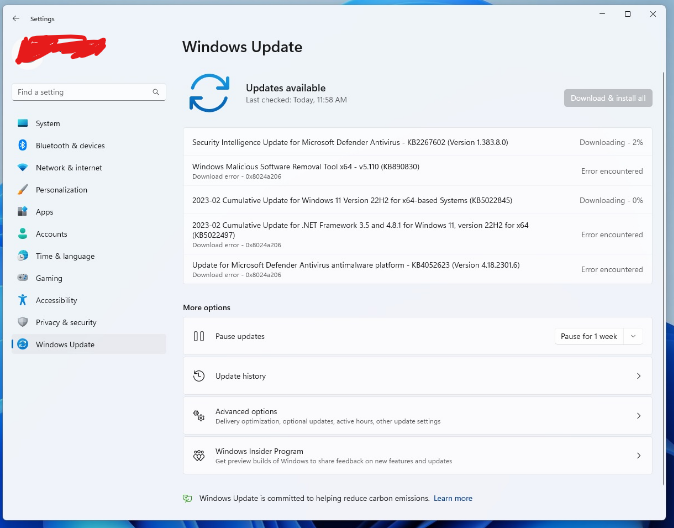
What this means for a machine in 2026
If either KB number is the newest thing in a machine’s update history, that machine has been unpatched for around three years. Check first, then act.
Check the version and build
- Press Win + R.
- Type
winverand press Enter.
Compare what it reports against the current picture:
| Version | Build family | Support status (August 2026) |
|---|---|---|
| Windows 11 25H2 | 26200 | Current release |
| Windows 11 24H2 | 26100 | Home and Pro until 13 October 2026 |
| Windows 11 23H2 | 22631 | Home and Pro ended 11 November 2025; Enterprise and Education until 10 November 2026 |
| Windows 11 22H2 | 22621 | Out of support — Home and Pro ended October 2024, Enterprise and Education 14 October 2025 |
| Windows 11 21H2 | 22000 | Out of support since October 2023 |
Get it current
- Open Settings with Win + I.
- Go to Windows Update and choose Check for updates.
- If a feature update to a newer version is offered, take it. Machines this far behind usually need several passes — check again after each restart until nothing new appears.
Take a restore point before starting, particularly on a machine that has not been touched in years: see how to create a system restore point.
If Windows Update will not move
Machines left alone for years frequently will not update in one step. In order of likelihood:
- Not enough disk space. A feature update wants 20 GB or more free.
- Damaged component store. From an elevated Command Prompt, run
DISM /Online /Cleanup-Image /RestoreHealth, thensfc /scannow, then reboot and retry. - An error code. The code tells you far more than the KB number does — see 0x80070103, 0x80070005 and 0x80072F8F – 0x20000.
- Hardware requirements. A machine that reached Windows 11 21H2 meets the bar for later versions in almost all cases, but a missing or disabled TPM after a firmware reset will block a feature update.
Getting a specific package by hand
For offline machines, or where Windows Update is managed and will not offer what you need, packages are available from the Microsoft Update Catalog. Search for the KB number, match the architecture, download the .msu and run it.
Installing KB5022845 or KB5022836 specifically is almost never the right move today — they are three years superseded, and installing them leaves the machine three years behind. Install the current cumulative update for whichever version the machine is running instead.
Frequently asked questions
What is the difference between KB5022845 and KB5022836?
Only the Windows 11 version they target. KB5022845 was for 22H2 (build 22621.1265); KB5022836 was for 21H2 (build 22000.1574). Both shipped on 14 February 2023 with the same month’s security content.
Does KB5022836 apply to Windows 10?
No. It is a Windows 11 21H2 package. Windows 10 received its own separate updates that month under different KB numbers.
Can I still install these?
They remain in the Microsoft Update Catalog, but there is no good reason to. They apply to branches that no longer receive security updates, so installing one leaves the machine exposed to three years of subsequently patched flaws.
My machine says Windows 11 21H2 and will not offer a newer version. What now?
Try the Windows 11 Installation Assistant or a mounted ISO to run an in-place upgrade, which keeps files and applications. If that is blocked, the usual culprits are free disk space, a disabled TPM in firmware, or third-party security software holding the upgrade back.